
Short answer: ScrumNav Scrum Poker lets your team vote on a Jira issue with a customizable deck, reveal votes together, agree on a suggested story point value, and apply it directly to Jira — without a separate estimation tool.
Why estimate story points inside Jira with Scrum Poker
Teams often run planning poker in a separate tool or chat, then manually copy story points into Jira. That adds friction and makes it harder to see how new estimates affect sprint capacity.
ScrumNav keeps planning poker in the same sprint planning view where you already review backlog, capacity, and load — so accepted points update capacity immediately.
What you can do
- Start a planning poker round from a Jira issue in the sprint planning view
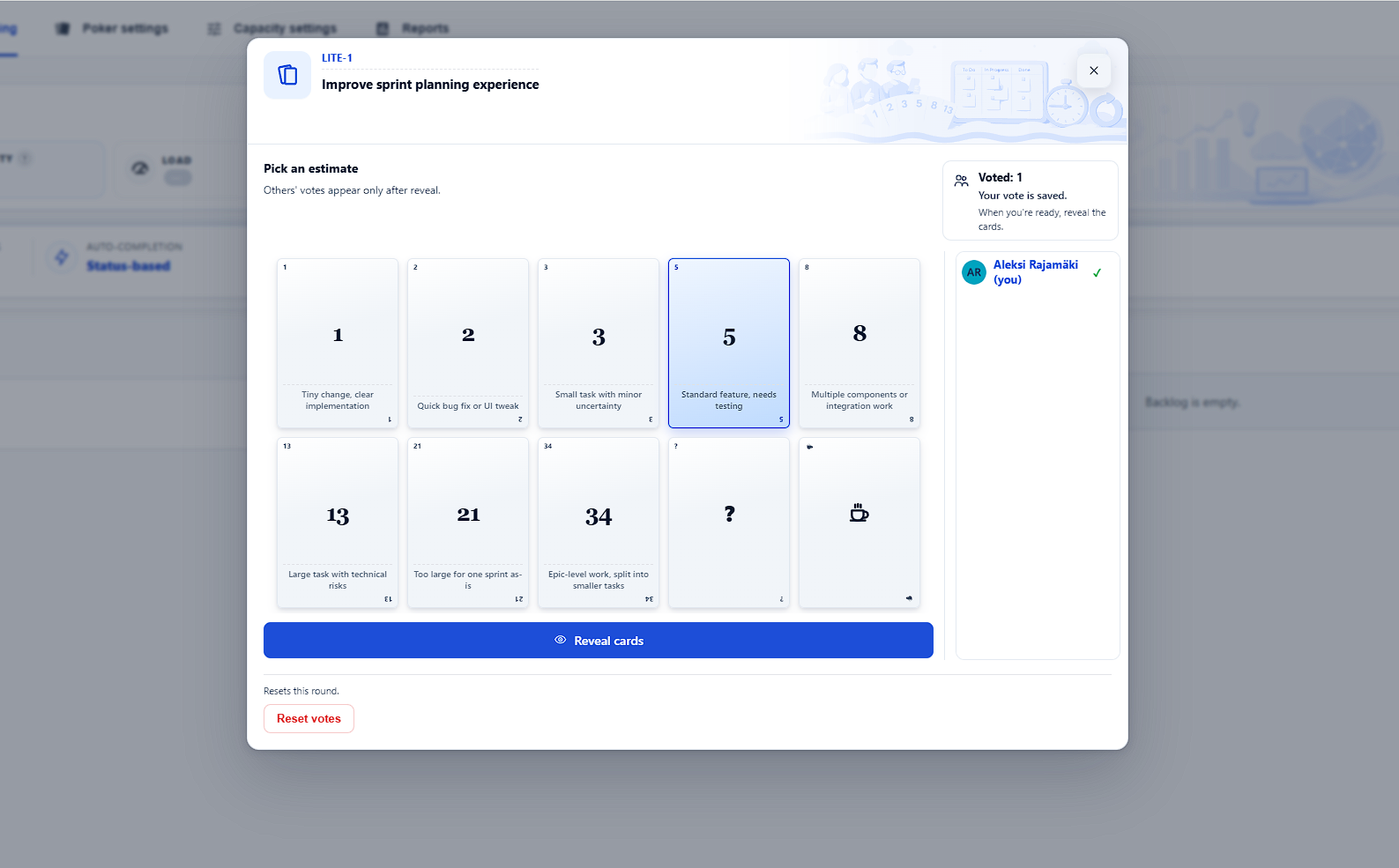
- Vote with a board-specific deck (values, captions, and order)
- Reveal votes when the team is ready
- See a suggested numeric story point based on team votes
- Apply the agreed value to the configured Jira story point field
- Reset and run another round on the same issue
- Use optional ? (“not sure”) and coffee-break cards
How to run Scrum Poker in Jira
- Open sprint planning in ScrumNav and select the board and sprint you are planning. See the sprint planning guide.
- Pick an issue from the sprint or backlog that needs an estimate.
- Open Scrum Poker for that issue from the planning view.
- Each participant votes using the board’s deck. Votes stay hidden until reveal.
- Reveal when everyone has voted. Discuss outliers if needed.
- Review the suggestion. ScrumNav proposes the most-voted numeric value; on a tie between numbers, the higher value wins.
- Apply as story points when the team agrees. The value is saved to Jira and reflected in sprint capacity and load.
Customize your poker deck
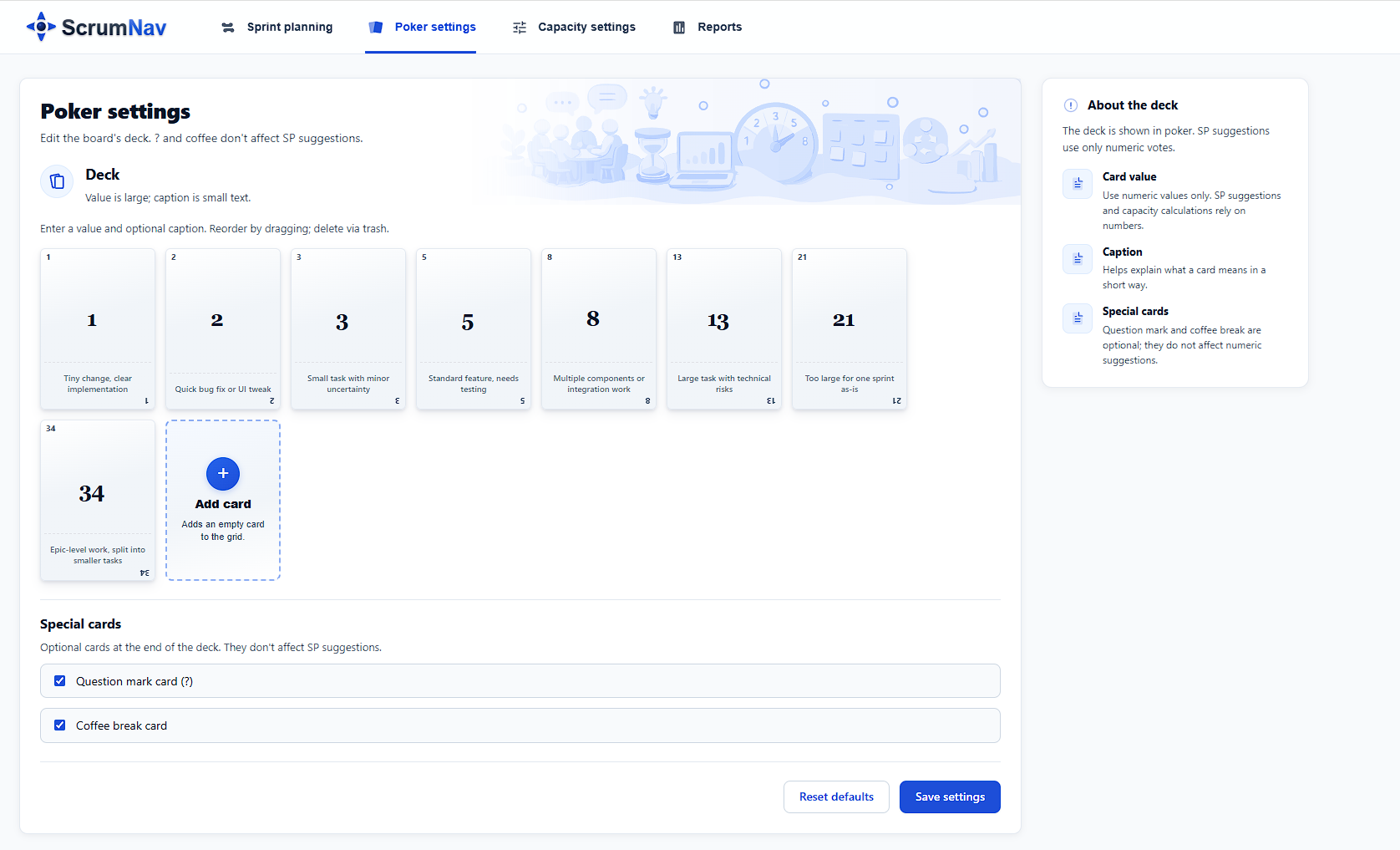
In poker settings (per board), you can define card values, add captions so the team shares the same meaning for each planning poker estimate, and reorder cards by drag and drop. Optional special cards:
- ? — “I need more information” (does not affect the numeric suggestion)
- Coffee break — pause the round (does not affect the numeric suggestion)
Frequently asked questions
- Does ScrumNav Scrum Poker work in Jira Cloud?
- Yes. ScrumNav is a Forge app for Jira Software Cloud. Scrum Poker runs inside the ScrumNav global page and updates the story point field you configured for the board.
- How does ScrumNav pick the suggested story points?
- After reveal, ScrumNav suggests the numeric estimate that received the most votes. If there is a tie between numeric values, the higher number wins. Optional “?” and coffee-break cards do not affect the numeric suggestion.
- Can we customize the poker deck?
- Yes. Each board can have its own deck — card values, captions, and order. You can also enable optional “?” and coffee-break cards in poker settings.
- Do poker votes save to Jira automatically?
- Votes are stored in Forge app storage for the active round. Story points are written to Jira only when someone clicks Apply as story points after the team agrees on the suggestion.
Interested in Scrum Poker inside Jira?